Linux Fundamentals & Bash
Overview
Linux is an open-source OS used across servers, cloud environments, networking equipment, cybersecurity labs, and embedded devices — especially important in cybersecurity since many security tools and servers run on it.
Key concepts
- Distributions: Ubuntu, Debian, Kali Linux, Fedora
- Linux file system hierarchy (/, /home, /root, /etc, /var, /tmp, /dev)
- Bash as the command interpreter
How it works
Overview
Linux is an open-source operating system used in servers, cloud environments, networking equipment, cybersecurity labs, development, and embedded devices. It's especially important in cybersecurity because many security tools and servers run on Linux.
A Linux distribution (distro) is a complete version of Linux that includes the Linux kernel, applications, package-management tools, and system utilities.
Linux Distributions
Ubuntu
A beginner-friendly distribution, commonly used on desktops, servers, and virtual machines.
Debian
A stable distribution that many others are built on — Ubuntu and Kali Linux are both Debian-based.
Kali Linux
A distribution focused on cybersecurity and penetration testing, including tools for network analysis, password auditing, web testing, and digital forensics. Only use Kali on systems you own or have explicit permission to test.
Fedora
Known for newer software versions. Connected to Red Hat Enterprise Linux, which is common in professional server environments.
Linux File System
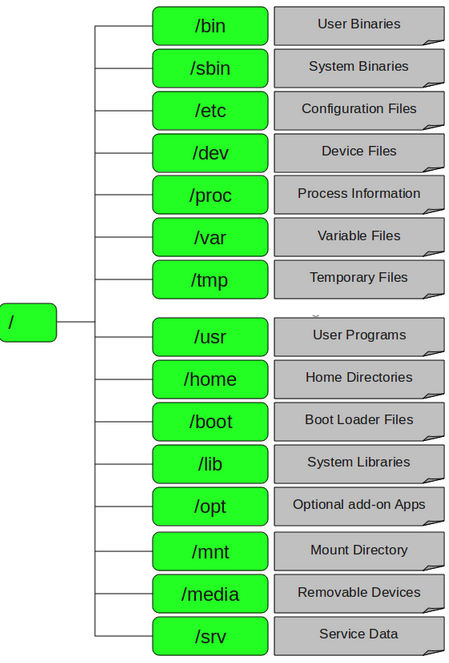
Linux organizes files into one main hierarchy starting from the root directory.
| Directory | Purpose |
|---|---|
/ | The root directory — the top level of the entire file system. |
/home | Stores personal files of normal users, e.g. /home/aryan. |
/root | The home folder for the root (administrator) account — different from /. |
/etc | System configuration files and settings. |
/var | Data that changes often — logs, caches, databases, print queues. |
/tmp | Temporary files that don't need to persist. |
/dev | Represents hardware devices — Linux treats many devices as files here. |
This conventional structure means administrators always know where to find important system files and configuration data.
Linux Terminal
The terminal lets users manage the OS through typed commands — an essential skill for cybersecurity, servers, networking, and system administration.
Bash
Bash (Bourne Again Shell) is a command interpreter that reads and runs commands typed by the user or placed into a script file.